Showing posts with label Digital Art Heaven. Show all posts

Thursday, December 22, 2016

Breath of Christmas Spirit-Forum Set


This tut was written for those with a basic knowledge of psp.
I am using the Awesome artwork by Sue Miller 
The tube is called Wishing You a Breath of Spirit 
You need a license to use this art work. Please do not use without a license.
 You can find this art at Digital Art Heaven  HERE

Supplies Needed
I used PSPX...but any of them should work.
Filters
Mura Meister Copies-Wallpaper Rotate and Line
Xero-Fritillary and Soft Vignette
AAA Frames-Foto Frame

Font of Choice, I used Arial Narrow

Drop Shadow usually V2 H2 50 black
 Let's get started
*Remember to add your drop shadow as you go along*

Forum Set
Signature tag

Open new image 600 x 250, fill with #362c70.
Paste your tube, resize to 50%, apply Mura Meister Copies-Wallpaper rotate, change the blend mode to Screen.
Go to Adjust, Blur, Motion Blur, Strength 100, Angle 315, then change the angle to 45,
apply Xero filter, Fritillary with these settings
5, 30, 50, 20
 
Resize your tube to 50%, paste in the center, duplicate twice, mirror one and move to the left and the other to the right, having the center one being the bottom one, apply Mura Meister Copies-Line with the 1/n fade out checked, change the blend mode to Luminance(L) and add the Xero filter-Fritillary with the same settings as before.
 
Duplicate the one on the right, Adjust, Blur, Gaussian blur at 5, change the blend mode to Screen, apply Xero filter-Soft Vignette with these settings
Elliptical, foreground color
Diagonal dots
1, 0, 0, 255
merge down.
The tube on the left, duplicate, Blur, Gaussian blur at 5, change the blend mode to overlay and add the Soft Vignette again with the same settings, merge down and then merge visible.
 
Take your Selection tool, draw out a small rectangle across the top on the fur of the hats, add a new layer, fill with white, change the blend mode to Soft light, then go to Effects, Edge Effects,
Enhance once, then go back and Enhance two or three times, duplicate, flip.
 
Type out what you would like, I typed out
****Wishing You A Breath Of Christmas Spirit****
I made a gradient with Red and Green for the wording also.
Don't merge just yet.
 
Avator
Open a new image a size for your group or forum, close off the wordart, copy your signature tag and place how you like, resize to fit, merge visible, add the frame to both, add your copyright and name.
 
If you would like to do the circle one, take your preset tool and the circle, with a width of 2 or 3, foreground color of choice, close off background color and draw a circle to fit your size you are using, then click inside with your magic wand, expand by 1, paste your resize signature tag, invert, delete, move below and add noise if you like, merge visible.
 
AAA Frames-Foto Frame
Change the default color to the red and black, now add your copyright and name.
 
That's it
Hope you enjoyed doing my tut.

Saturday, December 17, 2016

Thinking of Christmas

This tut was written for those with a basic knowledge of psp.
I am using the awesome artwork of  Janna Prosvirina 
The tube is called Robin Red
You need a license to use this art work. Please do not use without a license.
 
 You can find this art at Digital Art Heaven Store  HERE
 
Supplies Needed
I used PSPX...but any of them should work.
Scrap Home for Christmas by Bits N Bobs  HERE
Check out the rest of the Blog HERE
MPM Mask 125 HERE
Check out the rest of her blog HERE 
Filters
Xero-Fritillary, Clarity, Porcelain
 
Font of Choice, I used The Heart of Everything

Drop Shadow usually V2 H2 50 black
 *Remember to add your drop shadow as you go along*
 
Open a new image 800 x 800 or one you prefer, resize paper 1 to 23%, paste, apply your mask, delete, merge group, adjust your mask to fit your tag later.

Resize element 25 to 23%, duplicate, being on the bottom frame, free rotate to the left at 10 degrees, move to the left a little bit, then erase the parts showing below the top frame, being on the top frame, merge down. 
Click inside on all open sections with your magic wand 
expand by 5, resize paper 2 to 23%, paste, invert, delete, select none.

Paste your tube on the paper layer, resize to 75%, duplicate, move above the frame, erase the parts covering the frame, candles and ornaments.
Apply the Xero filter-Porcelain on both tubes, then Clarity.

Duplicate the frame, mirror and take your free hand tool and draw around the outer greenery and the two ornaments, copy paste as a new layer, then delete the rest of that frame.
This will take a little patience, you might try erasing the parts you don't want to keep.

Back on the original frame, apply the Xero filter-Fritillary with these settings
5, 30, 35, 35

Resize element 22 to 15%, place at the upper left, duplicate, mirror, flip, adjust.
Resize element 6 to 15%, paste at the upper left, just above the mask layer, duplicate, mirror, duplicate, flip, duplicate, mirror, duplicate again if needed and adjust, then merge these layers together and apply the Xero filter-Porcelain.

Resize element 15 to 15%, place on the left below the candles, sharpen once, duplicate, resize to 65%, paste on the right just below the greenery.
Resize element 7 to 10%, paste on the candle at the bottom.

On element 16, take your free hand tool, draw around the rope hanger and delete, then resize to 10%, paste on the upper left  part of the frame, duplicate, move over and down on the right.

Add any wordart if you like, I wrote out Thinking of Christmas, then applied a glass bevel, using EyeCandy 4000, then selected the wordart, float, defloat, expand by 2, new layer fill with a color of choice, select none and move below the wordart.

Add any other elements you would like, make it your own.
 
Crop your tag to be sure no stray shadows are on the edges of your tag.
Once happy with it all, close off any backgrounds, merge visible.
Resize first, then add your copyrights and name.

 That's it
Hope you enjoyed doing my tut.
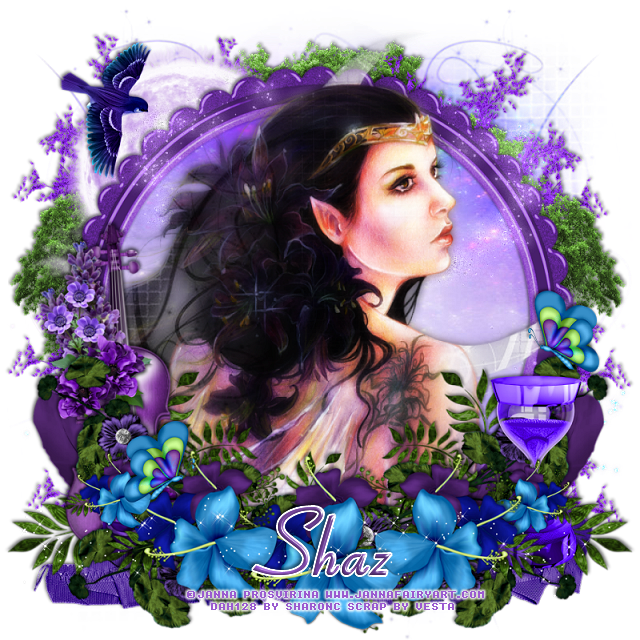
Thursday, February 4, 2016

Wonders


This tut was written for those with a basic knowledge of psp.
I am using the awesome artwork of  Janna Prosvirina 
The tube is called Estela
You need a license to use this art work. Please do not use without a license.
 
 You can find this art at Digital Art Heaven Store  HERE
 
Supplies Needed
I used PSPX...but any of them should work.
Scrap Midsummer Dream by Vesta's Visions  HERE
Check out the rest of the Blog HERE
MPM Mask 7 HERE
Check out the rest of her blog HERE 
 
Font of Choice, I used Aspire

Drop Shadow usually V2 H2 50 black
 *Remember to add your drop shadow as you go along*
 
Open a new image 800 x 800 or one you prefer.
Paste paper 13, enlarge the mask first up to 125%, apply, delete, merge group.

Paste frame 3, resize to 95%, go to Adjust, Hue and Saturation, colorize,
Hue 194, Saturation 150
Duplicate, mirror, erase some on the left side, so both sides looks the same, merge down, click inside the frame, expand by 5, paste paper 13, invert, delete, move below the frame, select none.

Paste your tube on top of the frame, apply the same mask, delete, merge group, duplicate the tube, go to Adjust, Blur, Gaussian blur at 5, change the blend mode to hard light, merge down, erase the part of the tube over the bottom of the frame.

Resize element 9 to 75%, paste on one side at the bottom of the frame, duplicate, mirror.
Resize element 19 to 65%, paste on one side, duplicate, mirror.
Paste element 27, free rotate to the left at 55%, move down, duplicate, mirror.
Resize element 5 to 55%, place in the center, duplicate, resize to 85%, move over, duplicate, mirror, duplicate again, resize to 50%, move to one side, duplicate, mirror.

Paste element 23 on the frame layer at the bottom.

Resize element 21 to 50%, place on the right below some of the greenery.
Resize 51 to 80%, place on the left just above the feather layer.

Paste element 42 below the paper layer of the frame at the upper left.

Resize element 26 to 35%, mirror, paste up by the moon on the left.

Paste element 53 on the mask layer, duplicate a few times and arrange around the frame the way you like.
Paste element 54 above the purple tree layer and do the same, duplicate and arrange how you prefer.

Paste Sparklies 3 above the frame layer on one side, duplicate mirror, change the blend mode to Luminance (L).

Paste Sparklies 1 on the top layer of the flowers.

Resize element 2 to 25%, duplicate, place where you like them.

Add any other elements you would like, make it your own.
 
Crop your tag to be sure no stray shadows are on the edges of your tag.
Once happy with it all, close off any backgrounds, merge visible.
Resize first, then add your copyrights and name.

 That's it
Hope you enjoyed doing my tut.

Saturday, December 12, 2015

Dreaming of a White Christmas-Forum Set


This tut was written for those with a basic knowledge of psp.
I am using the awesome artwork of Katerina Koukiotis.
The tube is called White Christmas
You need a license to use this art work. Please do not use without a license.
 
 You can find this art at the Digital Art Heaven Store  HERE
Supplies Needed
I used PSPX...but any of them should work.
 Scrap Winter Wonders by Gimptastic Scraps  HERE
Check out the rest of the blog HERE
Toxic Desirez Mask 1-5 I used the 4th one down HERE
Check out the rest of her blog HERE
Filters
Mura Meisters Copies-Line*

 Font of Choice, I used Tagettes
Drop Shadow usually V2 H2 40 black
 
Let's get started
*Remember to add your drop shadow as you go along*

Quickie Signature and Avator

Open a new image 600 x 250, fill with white, paste your tube, apply Mura Meister Copies-Encircle with the default settings.  Then go to Adjust, Blur, Motion Blur, with these settings
Angle 45, Strength 100, apply again changing the Angle to 315, change the blend mode to Luminance(L), now apply your mask, delete and merge group.

Resize your tube to 70%, paste on the right side, duplicate, Gaussian blur at 5, change the blend mode to overlay, merge down.
Paste plant 2 below the tube layer and move down some, apply Mura Meister Copies-Line*, change the blend mode to overlay.

Type out what you want on your tag, I typed Dreaming of a White Christmas and I changed the blur on the drop shadow to 15 after adding a medium white gradient.
Paste the Falling snow below your wordart.

If happy with it all, merge visible and add a frame of choice, and noise at 40%.
I added a frame by selecting all,  add a new layer, filled with  #c2bcc2, delete, select none, merge.
Add your copyright and name now.

Do an Avator of size and choice.
I did an 180 x 180, paste the background of the tag first, then the wordart and resized it, pasted the falling snow below the wordart, merged visible, new raster layer, fill with same color, contract by 3, delete, add noise to the frame and then merge visible again.
Add any copyrights and name.
 
That's it
Hope you enjoyed doing my tut.

Christmas Secrets

 
This tut was written for those with a basic knowledge of psp.
I am using the awesome artwork of  Marta Sarmiento.
The tube is called Christmas Secret
You need a license to use this art work. Please do not use without a license.
 
 You can find this art at Digital Art Heaven Store  HERE
 
Supplies Needed
I used PSPX...but any of them should work.
Scrap Christmas Ball by Pink Paradox Productions  HERE
Check out the rest of the Blog HERE
MPM Mask 54 HERE
Check out the rest of her blog HERE 
 
Font of Choice, I used Tagettes

Drop Shadow usually V2 H2 50 black
 *Remember to add your drop shadow as you go along*
 
Open a new image 800 x 800 or one you prefer.

Paste paper 22, resize to 80%, apply your mask, delete and merge group.

Paste frame 3, resize to 65%, click inside with your magic wand, expand by 4, resize paper 13 to 80%, paste, invert, delete, select none.

Resize your tube to 70%, paste off center to the left.

Resize element 57 to 70%, place below the tube layer, duplicate three times more and move one to the right more and the other two below the frame layer and up a bit, and to make the snow blend better, take your eraser and hit lightly on the tube snow.
Resize element 3 to 30%, place on the right below the tube layer.
Resize element 74 to 60%, place on the left just above the frame layer, duplicate, move to the right to the bottom layer, duplicate two more times and move over to the right more on one and a little more to the center with the other one.

Resize element 34 to 50%, place below the snowman.
Resize element 35 to 50%, place on the right in front of your tube.
Resize element 44 to 20%, place on the paper you just pasted.
Resize element 16 to 25%, place below the bells.

Resize element 72 to 45%, place behind your tube.
On the original element 72, resize to 65%, move to the bottom layer and upper left side, duplicate, mirror, adjust.
Resize a couple of elements to 15%, place where you like on the snow.
Resize element 59 to 50%, place below the frame layer on the right.
Resize element 5 to 25%, place on the right side.
Resize element 15 to 13%, place one on the snowman and the other on the small dog.
Resize sparkle element 87 to 45%, move below the frame layer.
Resize element 32 to 45%, place on the left behind your tube.
Resize element 36 to 35%, place on the right just above the frame layer, duplicate, move into the frame area and below the branches.
Resize element 33 to 25%, place on the left in front of your tube.

Add any other elements you would like, make it your own.
 
Crop your tag to be sure no stray shadows are on the edges of your tag.
Once happy with it all, close off any backgrounds, merge visible.
Resize first, then add your copyrights and name.

 That's it
Hope you enjoyed doing my tut.

Wednesday, October 14, 2015

Pumpkin Pixy Autumn

This tut was written for those with a basic knowledge of psp.
I am using the awesome artwork of  Sarah Pauline.
The tube is called Pumpkin Pixy
You need a license to use this art work. Please do not use without a license.
 
 You can find this art at Digital Art Heaven Store  HERE
 
Supplies Needed
I used PSPX...but any of them should work.
Scrap Hello to September by Digicats (and Dogs)  HERE
Check out the rest of the Blog HERE
DD Fall Autumn Set 1-Mask 2 HERE
Check out the rest of her blog HERE 
 
Filters
VM Extravaganza-Transmission
 
Font of Choice, I used A Safe Place to Fall

Drop Shadow usually V2 H2 50 black
 *Remember to add your drop shadow as you go along*

This is a quickie one.

Open a new image 800 x 800 or one you prefer.

Paste paper 5, apply your mask, delete and merge group, then paste paper 3, apply the mask again, delete, change the blend mode to overlay. Add noise at 25%, if you like.
  On the bottom mask take your pick tool and make a little larger.

Paste frame 2 and move down a little, take your free hand tool, draw around the frame, paste paper 7, invert, delete, select none, moving the paper below the frame.
Apply the VM Extravaganza filter-Transmission with these settings on the paper
20, 0, 10
Apply again changing the first number to 25.

Mirror your tube, resize to 90, paste more to the left on the frame, then move below the frame, duplicate and move above the frame and erase the part covering the wordart and the ribbon.

Resize corn n gourds to 30%, place below the top tube layer toward the left, duplicate, move over to the right, duplicate, mirror, move below the frame layer, duplicate again and move over a little to the right.

Resize the pumpkin to 30%, place more toward the right side.

Resize the squirrel to 30%, place by the pumpkin.
Resize acorns to 15%, place by the squirrel, duplicate as many times as you like and place where you like.

Resize the candle to 25%, place on the left side.

Add any other elements you would like, make it your own.
 
Crop your tag to be sure no stray shadows are on the edges of your tag.
Once happy with it all, close off any backgrounds, merge visible.
Resize first, then add your copyrights and name.

 That's it
Hope you enjoyed doing my tut.

Friday, September 25, 2015

Snowflake Dreams

This tut was written for those with a basic knowledge of psp.
I am using the beautiful tube, called Goddess of Winter by
Marta Sarmiento
 You need a license to use this art work. Please do not use without a license.
 
 You can find this art at Digital Art Heaven  HERE
Supplies Needed
I used PSPX...but any of them should work.
Scrap Navidad-09 by My Warehouse of Dreams HERE **Check out the rest of her blog** HERE
Template 709 by MPM HERE  **Check out the rest of her blog** HERE
WSL_Mask 84 HERE
and DD Mask 10 HERE  **Check out the rest of her blog** HERE

Font of Choice, I used Alex Brush

Drop Shadow usually V2 H2 50 black
 
Let's get started
*Remember to add your drop shadow as you go along*

Open the template, hold the shift key and hit the letter d to duplicate, close the original, delete the credits and layer 5.
Go to Image, Canvas size, make it 800 x 800 or what you prefer.

Paste paper 1, apply WSL_Mask 84 first, delete and merge group, lower the opacity to 75.
Paste paper 1 again and apply DD Mask 10 next, delete, and merge group, flip and use your Pick tools to adjust the size to your tag on both mask layers.

Select layer 1 of the template, select all, float, defloat, paste paper 1, invert, delete, then go to Selections, Modify, Select Selection Borders and change the number to 5, add a new raster layer, fill with white, select none, add noise at 50%.

Layer 2, paste paper 2, move to have more of the white showing, then go to Effects, 3D Effects,  Inner bevel width on 2 and with these settings
8, 4, 4, 0
48, 36, 42
color white
Layer 3 of the template, add noise at 50%.

Layer 4, paste paper 1, invert, delete.
Layer 6, add noise at 50% or more if you like.
Layer 7, paste paper 2, again move the paper to get more white showing, invert, delete.
Merge layer 9 down with layer 8, change the color to by going to
Adjust, Hue and Saturation, colorize with these numbers
Hue 145, Saturation 165

Layer 10, add noise at 15%, add your drop shadow.
Add the same bevel setting to layer 11 as you used before.

Paste your tube on the left, resize to 75%, duplicate the tube, now select layer 2 that you filled, select all, float, defloat, invert, and being on the bottom tube, delete, select none. Now back on the top tube erase the parts outside the layer 2 area.
Resize element 16, place at the bottom part of your tag, with the branches under the wordart, refer to my tag.

Resize element 15 to 75%, place just above the mask layer toward the bottom of your tag.

Resize element 46 to 50%, paste between the two mask at the top right, sharpen more, once or twice, depending on what you like, duplicate, mirror, duplicate again, flip and adjust.

Resize snowflake 1a to 10%, place on one of the small squares, sharpen once and change your drop shadow color to one that matches your tube, duplicate and move over to the left in the other square. Duplicate them as many times as you like and place where you like, resizing a little again if you like. Remember to sharpen if you resize.

Resize element 38 to 15%, place at the bottom below the branch/roping looking element on the right, duplicate mirror, bring back toward the center a bit.

Resize element 55 to 15%, free rotate to the left at 90, place below the ribbon layer at the bottom on the left side, duplicate, mirror and adjust how you like, duplicate again, flip, move down below the branch layer.

Resize element 53 to 15%, free rotate to the left at 90, place above the tube layer on one side, duplicate, mirror.

Resize element 44 to 15%, place a little off center on the blue square.

Add any other elements you would like, make it your own.

Crop your tag to be sure no stray shadows are on the edges of your tag.
Once happy with it all, close off any backgrounds, merge visible.
Resize first, then add your copyrights and name.

That's it
Hope you enjoyed doing my tut.

Monday, September 14, 2015

Autumnween


This tut was written for those with a basic knowledge of psp.
I am using the beautiful tube, called Autumn Witch by
GiadaC
 You need a license to use this art work. Please do not use without a license.
 
 You can find this art at Digital Art Heaven  HERE
Supplies Needed
I used PSPX...but any of them should work.
Scrap Halloween Magic by Horseplay Pasture's Designs  HERE  
RR Mask Set 85 #1 HERE
Filters
Xero-Soft Mood, Clarity
Mura Meister Copies-Encircle
Font of Choice, I used Witches Magic

Drop Shadow usually V2 H2 50 black
 
Let's get started
*Remember to add your drop shadow as you go along*

Open a new image 800 x 800 or one you prefer.
Paste paper 8 or one you prefer, apply your mask, delete and merge group.

Paste element 65, click inside with your magic wand, expand by 5, resize paper 16 to 65%, paste, invert, delete, do not deselect yet.
Resize your tube as needed, if using the one I am, I resized it to 60%, delete and select none.

Apply the Xero Filter-Radiance first and then Clarity.
Resize element 74 to 85%, place on the left side and apply the same filters to this also.
Paste element 12 on the house and add the same filters again.

Paste element 27 on the left side below the paper layer of the frame and adjust how you prefer, duplicate, mirror, move down, erase the bottom part you don't want to show, duplicate, move up and in some.

Resize element 60 to 70%, place on the right side, move up some and apply the same filters to this one also.

Resize element 14 to 45%, place on the right by the candles, apply the same filters again, duplicate, resize to 75%, move over to the left just a bit.
Resize element 12 to 70%, place on the right below the pumpkins and apply the xero filter.

Resize element 26 to 55%, apply Mura Meister Copies-Encircle, paste just above the mask layer, move up duplicate, flip and adjust. Again apply the Xero filter as before.

Resize element 20 to 40%, place on the upper left side below the house layer, duplicate, move down by the broom layer and place how you like.

Once happy with it all, close off any backgrounds, merge visible.
Resize first then add your copyright and name.

That's it
Hope you enjoyed doing my tut.

Wednesday, September 9, 2015

Autumn Time


This tut was written for those with a basic knowledge of psp.
I am using the beautiful tube, called Autumn Elven Lady by
Joanna Bromley
 You need a license to use this art work. Please do not use without a license.
 
 You can find this art at Digital Art Heaven  HERE
Supplies Needed
I used PSPX...but any of them should work.
Scrap Vision of Autumn by Magik HERE  
 Check out the rest of her blog HERE
DD Template 19 HERE
DD Fall Mask 2 HERE

Filters
Xero-Soft Mood, Clarity
Font of Choice, I used MazurkaNF

Drop Shadow usually V2 H2 50 black
 
Let's get started
*Remember to add your drop shadow as you go along*

Open the template, hold the shift and hit the letter d to duplicate, close the original, delete the credits, font info and the 2 yellow strips.
Go to image, canvas size, and make it 800 x 800 or one you prefer.

Paste paper 3 or one you prefer, apply your mask, delete and merge group.

Merge the right orange strip down with the left orange strip, select all, float, defloat, paste paper 14, invert, delete, and delete the template layer also.

Merge the right red square down with the left red square, select all, paste paper 9, invert, delete.

Merge the right green strip down with the left green strip, select all, paste paper 4, invert, delete, keep selected, resize your tube to 70%, paste on one side, delete,
mirror the tube you resized and paste on the other side, delete, select none, merge down.
Apply the Xero filter-Soft Mood, then Clarity and change the blend mode to Luminance (L)

If you want to change the color of the leaves, change to your liking, I left them the color they were.

Select the red circle, float, defloat, resize your tube to 80%, paste, duplicate, being on the bottom tube, invert, delete, select none. Back on the top tube erase the parts outside the circle. Move above the wordart and erase part of the tube to let however much of the wordart you want showing, then add a fat gradient glow to the wordart.
Paste flower 2 below the tube layer on the red circle.

Change the dotted leaves to a color of choice.

Resize mushroom 2 to 60%, place on the lower right side.
Resize the dandelions to 60%, place on the right below the mushroom layer.
Resize the faerie to 35%, place on the mushroom, moving the dandelions up higher.

Resize the butterfly to 25%, free rotate to the left at 15, place where you like and duplicate as many times as you like and place.

Paste the leaf scatters 2 on the lower right just above the mask layer.

Once happy with it all, close off any backgrounds, merge visible.
Resize first then add your copyright and name.

That's it
Hope you enjoyed doing my tut.

Monday, September 7, 2015

Whisper of Fall

This tut was written for those with a basic knowledge of psp.
I am using the beautiful tube, called Whisper of Fall by
Janna Prosvirina
 You need a license to use this art work. Please do not use without a license.
 
 You can find this art at Digital Art Heaven  HERE
Supplies Needed
I used PSPX...but any of them should work.
Scrap Bellissimo  Vita by Elli's Creations HERE  
 Check out the rest of her blog HERE
CM_MBandSW_Fall Mask 1 HERE
It is in the second set of masks
MPM Mask 54 HERE

Font of Choice, I used Waterfalls 

Drop Shadow usually V2 H2 50 black
 
Let's get started
*Remember to add your drop shadow as you go along*

Open a new image 800 x 800 or a size you prefer.
Paste paper , 7 apply MPM Mask 54, delete and merge group, then paste paper 3, apply the MBandSW Fall Mask, delete and merge group.

Paste element 29, move down, duplicate, mirror, paste your tube and adjust on the grass.
Resize element 30 to 50%, place on the left side, below your tube layer.

Resize element 63 to 60%, place behind your tube, duplicate, mirror, move out
on each side,
Resize element 40 to 70%, duplicate two more time for a total of 3, move them in the center below your tube layer and between the other trees.

Paste element 18 just above the mask layer and move up some so some of the
tall grass flower parts are showing.

Resize element 27 to 30%, place on the tree where you like, duplicate, mirror and place where you like again.

Resize element 23 to 50%, place on the right below the tube layer.

Resize element 58 to 30%, place by the tube on the right.

Resize element 52 to 25%, place on the table.

Resize the Lamp to 40%, place by the book.

Resize element 32 to 50%, duplicate as many times as you would like and place in different areas, mirror one or two also.

Resize element 20 to 30%, place below the tube layer where you like, duplicate two or three more times and move around.


Resize 42 to 40%, place on the table, duplicate and move below the wine bottle.

Resize element 12 to 40%, place on the left side below the light grass layers.

Paste element 41 above the tube layer, flip and adjust at the top.

Paste element 69 at the top on the left side, duplicate, mirror, move it below the tree layers on the right.

Resize element 24 to 50%, free rotate to the right at 90, place under the tube, duplicate, mirror.

Resize element 49 to 70%, place just above the mask layers in the center, duplicate, move to the left and below the first frame, erase the overlapping part in the center frame, duplicate, mirror.

Once happy with it all, close off any backgrounds, merge visible.
Resize first then add your copyright and name.

That's it
Hope you enjoyed doing my tut.

Thursday, September 3, 2015

The Rose Forum Set and Snags


This tut was written for those with a basic knowledge of psp.
I am using the Awesome tube, called Red Rose by
Sherin Mustafa
 You need a license to use this art work. Please do not use without a license.
 
 You can find this art at Digital Art Heaven  HERE
Supplies Needed
I used PSPX...but any of them should work.

Filters
Mehdi-Weaver
AAA Frames-Foto Frame

Font of Choice, I used Final Fantasy for The
and Dragon is coming for Rose

Drop Shadow usually V2 H2 50 black
 
Let's get started
*Remember to add your drop shadow as you go along*

Forum Set
This is an easy peasy one

Signature tag

Open new image 600 x 250, fill with #4f1d16, then paste your tube, apply Mehdi Filter-Weaver with the number set on 300, duplicate and move over, matching the seams in the center to not show, then merge down. 
Paste your tube again, mirror, resize to 70%, change the blend mode to soft light,
merge down and crop your tag.

 Apply AAA Frames-Foto Frame with these settings
10, -255, -255, 0, 0, 0, 0, 100
Click on the little drop down where you see the word default and change that to black with white shadow.

Then apply the L en K filter-Zitah

Paste your tube again, resize to 70%, move over to the right.

I typed out the words The Rose, using Final Fantasy for the word the and
Dragon is coming for the word rose.

Add your name and free rotate to the right and place on the right by the hair
Add your copyright and merge visible.

For the Avator
Open a new image 175 x 175 or a size you prefer, paste your tag, resize to 80%, move over until you see the wordart, merge visible, apply the AAA Frame, Foto frame with the same settings as before.
Add your name and copyright,merge visible.

Below you will find some snags, do not alter them in any way...enjoy

That's it
Hope you enjoyed doing my tut.

Click to get the original size, then right click and save.


Friday, August 28, 2015

Vintage Love

This tut was written for those with a basic knowledge of psp.
I am using the beautiful tube, called Chanson d'avril by
Veronica Nunez
 You need a license to use this art work. Please do not use without a license.
 
 You can find this art at Digital Art Heaven  HERE
Supplies Needed
I used PSPX...but any of them should work.
Vintage Valentine by Gimptastic  HERE  
Check out the rest of her Blog HERE
RR Mask  Set 2-1 HERE

Font of Choice, I used

Drop Shadow usually V2 H2 50 black
 
Let's get started
*Remember to add your drop shadow as you go along*

Open a new image 800 x 800 or a size you prefer.
Paste paper 8, resize larger to 130, apply your mask, delete and merge group.

Paste frame 5, free rotate to the right at 90, duplicate, move over some and erase or use your selection tool to remove the part in the center you do not want, merge down.
Resize the corner element to 90%, place below the frame on the upper right, duplicate, mirror, duplicate, flip, duplicate, mirror.
Erase some of the overlapping leaves on the sides, then merge these 4 layers together.

Clip inside your frame with your magic wand, expand by 5, paste paper 4, invert, delete, move below the frame, mirror your tube first, paste on the left side, delete, select none. Change the blend mode to overlay.

Being on top of the frame layer, paste your tube on the right side, resize to 85%.

Paste flower 3 at the bottom of the frame, duplicate a couple of times and move on each side. Duplicate one and resize to 70%, place on top of the others, duplicate again and move over.
Resize flower 2 to 60%, place below the other flowers at one end, duplicate, mirror.
Resize the teapot to 70%, place below the flowers on the right.
Resize the label to 70%, free rotate to the left at 15%, place on the left below the darker flower layer.
Resize heart 1 to 60%, place by the wordart label, duplicate, move down some in front of the first heart.
Resize the pearls to 90%, place just above the frame layer, duplicate, change the blend mode to burn and merge down, duplicate, mirror, flip and move back down to the bottom.
Resize flower 1 to 70%, place on the left below the wordart label, duplicate, resize again to 70%. Duplicate the smaller one, mirror, duplicate again, adjust how you like them on the right.

Once happy with it all, close off any backgrounds, merge visible.
Resize first then add your copyright and name.

That's it
Hope you enjoyed doing my tut.

Monday, August 24, 2015

Eyes of the Cheetah Forum Set and Snags


This tut was written for those with a basic knowledge of psp.
I am using the awesome tube, called Leopard Looking by  Guki Creations.
You need a license to use this art work. Please do not use without a license.
Animals of the wild are so beautiful, you will tagging with this tube.
 
 You can find this art at Digital Art Heaven  HERE
Supplies Needed
I used PSPX...but any of them should work.
Scrap Forest Keepers by Gimptastic  HERE  
Check out the rest of her Blog HERE

Filters
VM-Extravaganza-Transmission
Xero-Porcelain and Clarity
AAA Frame-Foto Frame

Font of Choice, I used Remachine Script

Drop Shadow usually V2 H2 50 black
 
Let's get started
*Remember to add your drop shadow as you go along*

Forum Set
Signature tag size 600 x 250  or a size you prefer.
Paste paper 2, merge visible.
Apply the VM-Extravaganza-Transmission with these numbers
75, 0, 8
Go to Effects, Edge effect, enhance twice.

Paste your tube, mirror, change the blend mode to overlay, sharpen once.
Paste your tube again, resize to 35%, place on the left side, apply the
Xero filter-Porcelain, then Clarity.

Paste the tree below the tube layer on the left, adjust, duplicate, mirror and
adjust to your liking.
Paste the house below the tree layer on the left and move to the left behind the tube.
Merge visible, then apply the AAA Frame-Foto Frame, twice with these settings.
Width 5, Opacity 50, all other numbers left on 0

Avator

Open a new image 175 x 175 or a size you prefer or your group or forum allows.
Paste your signature tag, resize to 80%, move how you like, merge visible,
apply the AAA Frame-Foto Frame with the same settings from before.

Once happy with the signature tag and the Avator, add your copyright and name.

That's it
Hope you enjoyed doing my tut.

Below are some snags for you to enjoy
Please do not alter in anyway, or add names to them.
Thank you
Enjoy


Enjoy
 

Monday, August 17, 2015

School Is Cool


This tut was written for those with a basic knowledge of psp.
I am using the awesome artwork of Kathy Siney.
You need a license to use this art work. Please do not use without a license.
This tube can be used in so many different styles, you will love tagging with this tube.
 
 You can find this art at Digital Art Heaven  HERE
Supplies Needed
I used PSPX...but any of them should work.
 Back To School by Peggers  HERE
Check the rest of Creative Addictions Attitude Blog  HERE
Millie's PSP Madness Mask 87  HERE
Check out the rest of her Blog HERE
Animation 518 by Scrappy Bit of Fun HERE
Check the rest of her blog  HERE

Filters
Xero-Soft Mood, Clarity, Soft Vignette

Font of Choice, I used Big Surprise

Drop Shadow usually V2 H2 50 black
 
Let's get started
*Remember to add your drop shadow as you go along*

Open a new layer 800 x 800 or a size you prefer, fill with white, paste paper 4, apply your mask, delete, merge group.
Resize your mask to fit your tag once done.

Paste frame 7, resize to 95%, then paste frame 6 on top, click inside with your magic wand, expand by 5, paste paper 22, invert, delete, do not deselect yet.
Free rotate your tube, right at 45 degrees, paste, adjust, delete, select none.
Apply the xero filter, Soft Mood at default setting,  then Clarity at default setting and then Soft Vignette with these settings
Elliptical, foreground color, Square mesh
0, 0, 0, 255

Paste your tube on top of the frames, resize to 80%, placing in the center.
Paste the wordart School is Cool under your tube at the bottom.

Resize element 15 to 55%, place on the left below the wordart layer, duplicate,
mirror.
Resize element 5 to 50%, place on the left below the wordart.
Resize the laptop to 55%, place on the right side.
Resize the pencils to 45%, place on the left side.

Resize element 1 and 2 to 55%, place one on each of the books, below the laptop layer.
On the blue one click inside the frame of the book, expand by 5, paste your resize tube, invert, delete, select none, change the blend mode to hard light.

Add any other elements that you would like.

Once happy, if going to animate, keep the white background and merge visible, if not going to animate, close off your background if you used one, merge visible.

Resize first, then add copyright and name.

Animation
Take your merged layer to animation, add layers to your tag to match how many layers your animation has.
The animation I used has 22 frames.
I also resize it to 50%, go to Edit, select all, animation resize to 50.
Being on the animation, Edit select all, copy, then being on the tag, edit, paste into the selected frame, and paste it on the laptop screen.

That's it
Hope you enjoyed doing my tut.

Monday, August 10, 2015

Dreaming


This tut was written for those with a basic knowledge of psp.
I am using the awesome artwork of Katerina Koukiotis.
The tube is called Day Dreaming
You need a license to use this art work. Please do not use without a license.
 
 You can find this art at the Digital Art Heaven Store  HERE
Supplies Needed
I used PSPX...but any of them should work.
On A Tropical Breeze by Horseplay's Pasture Design  HERE
Check out the rest of the blog HERE
WSL_Mask 84 HERE

 Font of Choice, I used Sverige Script
Drop Shadow usually V2 H2 40 black
 
Let's get started
*Remember to add your drop shadow as you go along*

Open a new image 800 x 800 or one you prefer, paste paper 5, apply your mask, delete and merge group.

Paste element 30, resize to 90%.
Take your Free hand tools, draw around the element, paste paper 3, invert, delete, move below the frame element.

Paste your tube under the frame element, resize to 65%, change the blend mode
to Luminance (L), place where you like.

Resize element 29 to 25%, place below the tube layer where you like, duplicate and move over and up some.

Paste the sand on top of the frame element, duplicate, move over some.

Paste element 6 above the paper layer of the frame layer, move to the right, duplicate, mirror.

Paste element 57 below your tube layer and adjust to your liking.

Paste element 50 below the frame layer on one side, resize to 75%, duplicate,
mirror, erase any part showing in the frame.

Take seashells 24, 25, and 25, resize to what you like and place on the sand.
I resized all mine to 30%. Duplicate as many of them as you want and mirror.

Resize element 38 to 25%, paste where you like on the sand, duplicate and move over a bit.

Paste element 81 on one side below the sand, duplicate, mirror.
Duplicate one and resize to 55%, move over a bit, duplicate, mirror.

Resize element 16 to 40%, mirror and place on the right.

Resize element 69 to 30%, place on the left side below the shells.

Being on the top layer,
Go to your pre shape, select the Ellipse, close off the background color, any color will do for the foreground, width at 2, then add a new raster layer and draw a circle around the frame for your wording.
Select your text tool, hover over the circle you just drew until you see an A with a curve under it, type out what you would like, adjust first, then convert the wording to a raster layer and delete the circle layer.
I typed out Dreaming three times, since the tube is called Day Dreaming

Add any other elements you would like.

Once happy with it all, close off any backgrounds, merge visible.
Resize first, then add your copyrights and name.
 
That's it
Hope you enjoyed doing my tut.