Showing posts with label Misticheskaya. Show all posts

Monday, August 8, 2016

Sunflower Beauty


This tut was written for those with a basic knowledge of psp.
I am using the awesome artwork of  Misticheskaya .
The tube is called Actana
You need a license to use this art work. Please do not use without a license.
 You can find this art at PFD Store  HERE
Supplies Needed
I used PSPX...but any of them should work.
 Scrap  Sunflower Daze  by Jenns Designs HERE
Check out the rest of the blog HERE
Scrappy Bit of Fun Mask 0195 by Simone  HERE
Check out the rest of the blog HERE

Font of Choice, I used Script MT Bold

Drop Shadow usually V2 H2 50 black
Drop shadow on this one I used V-2 H-2 Blur 15
Use whatever drop shadow you prefer
 *Remember to add your drop shadow as you go along*

Open a new image 800 x 800 or one you prefer.
Paste paper 3 or one of choice, apply your mask, delete and merge group.
Paste element 47, move to the upper left, duplicate, mirror, adjust, merge down, duplicate, flip, adjust to fit your tag later.

Paste frame 2, resize to 95%.

Paste element 11 and move down.

Paste element 45, resize to 95%, place in front of the wagon, duplicate, move behind the wagon, duplicate again and move how you like behind the wagon.

Resize your tube to 35%, place in front of the wagon where you like.

Paste element 3 above the wire layers, adjust how you prefer, duplicate, resize to 75%, place on one side, duplicate, mirror, adjusting both to how you like.

Paste element 8 on the right side above the red bushes, duplicate, resize to 75%, mirror, adjust, duplicate again, resize to 75%, move above the wagon on the left, duplicate, mirror, duplicate again, move behind your tube layer.

Resize element 17 to 20%, place by the boot of the tube, duplicate, move to the right a bit and under the boot.

Paste element 50 at the top right, duplicate, move to the left and below the tube layer.

Resize element 23 to 20%, place on the flowers by the boot, duplicate twice, mirror one, move where you like.
Resize element 40 to 50%, mirror, place on the left below the tube layer.

Paste element 9 on the mask layer, move to one side, duplicate, mirror, duplicate, flip, duplicate, mirror.

Resize element 34 to 50%, place below the flowers behind the wagon, duplicate, mirror, adjust to your liking.

Resize element 35 to 50%, place on the right below the first grass layer and to the right.

Resize element 43 to 50%, place just above the wire layers on the left.

Add any other elements you would like, make it your own.

Crop your tag to be sure no stray shadows are on the edges of your tag.
Once happy with it all, close off any backgrounds, merge visible.
Resize first, then add your copyrights and name.
That's it
Hope you enjoyed doing my tut.

Tuesday, October 14, 2014

Witch in Training


This tut was written for those with a basic knowledge of psp.
I am using the awesome artwork of  Misticheskaya .
You need a license to use this art work. Please do not use without a license.

 You can find this art at PFD Store  HERE
 
Supplies Needed
I used PSPX...but any of them should work.
Ghostly Manners FTU by Angela's Creations  HERE
The kit is no longer on her blog, have no idea what she did with it.
Sorry for the problem.
Template by Dee and Kandee  Collabs  HERE
WSL_Mask 84  HERE
Filters
Oliver's Filter-Toile d' Araignee
Font Witched
 
Drop Shadow usually V2 H2 50 black

Open the template, duplicate and delete the credits, and the star, then go to Image, canvas size and as usual mine is 800 x 800.

Resize paper texture 70 to 84%, paste and apply your mask, delete and merge group, move below the template layers.
Green rectangle, resize paper sg3 to 84% and paste, invert delete.
Leave the orange strip as it.
Teal rectangle,  resize paper texture 55 to 84%, paste, invert, delete.
Purple oval, resize paper texture 70 to 84%, invert, delete.
Green stripe and orange circle leave as is.
Orange square, paste paper 18, apply Oliver filter-Toil d'Araignee
Leave green rectangle as it.
Teal circle, resize sg3 paper to 84%, paste, invert, delete.

Resize the tree to 60%, mirror and place off center a bit.
Resize the grass hill to 50%, place on one side, duplicate and mirror.

Resize your tube to 40%, and place on the right side.

Resize the haunted house to 10%, free rotate to the right at 10%, place on the right side behind your tube layer.

Resize the pumpkin patch to 15% and place in the center more in front of the tree.
Resize the boiling cauldron to 25% and place on the left side.
Resize the bottle to 10%, place below the cauldron layer, duplicate, move over by the witch.
Merge all the wordart together and resize to 75%, place at the bottom of your tag where you want it.
Resize the bat to 3%, duplicate however many times you would like and place where you like them.
Paste the sparkle element 2 on the left side, move below the orange circle layer.
Resize the owl to 15%, place on the upper left on the tree.

Resize the ghost to 5%, place by the house, duplicate a couple of times and place where you like.

If you are going to do a signature do not merge yet.

Add any other elements that you would like, once happy, close off any background and merge visible.
Resize first, then add your Copyrights and name and that's it.

If you want to do a signature

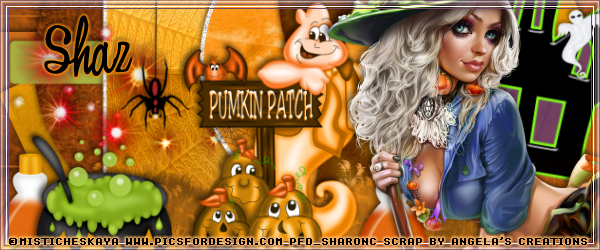
Open a new image 600 x 250, fill with #cb6c1a, close off your tube layer and wordart layer of your tag and paste, resize to 95% and adjust how you want it, then go back to your tag, open your tube layer, and copy and paste on the right side.
Merge visible and add a frame of choice, then add your copyright and name.
For the Avator,
size depending on your group or forum.
I did mine 150 by 200, copy the tag, resize to 75% and place how you wanted it, then merge visible, add your frame, copyright and name.
 
Hope you enjoyed doing this tut.
 photo buttonforpagefall_zps98c7cc22.png