Showing posts with label Summer. Show all posts

Monday, August 22, 2016

Watermelon Kisses


This tut was written for those with a basic knowledge of psp.
I am using the awesome artwork of  Verymany.
The tube is called Watermelon.
You need a license to use this art work. Please do not use without a license.
 You can find this art at their Store  HERE

Supplies Needed
I used PSPX...but any of them should work.
 Scrap  Watermelon Kisses by  Melissaz Creationz   HERE
Check out the rest of the blog  HERE
Squirrely's Treehouse Mask 69 HERE
Check out the rest of the blog HERE

 Font of Choice, I used Watermelon Script

Drop Shadow usually V2 H2 50 black
 *Remember to add your drop shadow as you go along*

Open a new image 800 x 800 or a size you prefer, paste paper 10, resize larger to 125%, apply your mask, delete, merge group.
Paste element 35 on your mask layer, click inside with the magic wand, expand by 5, paste paper 10, invert, delete.

Paste element 16 on the left and move up toward the top, duplicate, move down, duplicate both and mirror both, adjust to your liking.
Paste element 15 at the top, duplicate, flip, resize to 85%, place on one side, duplicate, mirror, adjust to your liking.
Paste element 11 below the flower layers.

Resize your tube to 60%, paste above the flower layers in the center.

Paste element 26 on the right by the foot of the tube, duplicate, move to the left below the tube layer.
Paste element 25 below the tube on the right by the foot and move out just a bit.
Resize element 24 to 85%, place on the left above the tube layer by the leg.
Paste element 27 by the watermelon slice.
Paste element 9 below the tube layer on the right by the foot

Resize element 14 to 60%, duplicate, place one on the left and one on the right below the flower layer, adjust how you like.
Resize element 20 to 60%, mirror, place on the bucket handle.
Resize element 19 to60%, free rotate to the right at 25, place at the upper left.

Resize element 8 to 50%, duplicate, place by the kisses squares.
Paste element 28 at the bottom where you like.

Add any other elements you would like, make it your own.

Crop your tag to be sure no stray shadows are on the edges of your tag.
Once happy with it all, close off any backgrounds, merge visible.
Resize first, then add your copyrights and name.
That's it
Hope you enjoyed doing my tut.

Sunday, August 21, 2016

I Love Summer


This tut was written for those with a basic knowledge of psp.
I am using the awesome artwork of  Keith Garvey.
The tube is called Tanned.
You need a license to use this art work. Please do not use without a license.
 You can find this art at his Store  HERE

Supplies Needed
I used PSPX...but any of them should work.
 Scrap  Morning Sunshine Sampler by Digicats (and Dogs)  HERE
Check out the rest of the blog  HERE

Filters
Xero-Bad Dream
Toadies-What Are You

 Font of Choice, I used Waterlily

Drop Shadow usually V2 H2 50 black
 *Remember to add your drop shadow as you go along*

Open a new image 800 x 800 or a size you prefer.

Paste Lei 2, click inside with your magic wand, expand by 5, paste paper felt 1, invert, delete, move below the frame, paste your close up, delete, select none.
Apply the Xero filter-Bad Dream to the tube.

Duplicate the frame, apply Toadies filter-What Are You with both numbers on 25, move below the paper layer of the frame. Drop shadow color on this one is #fdac6b.

Paste the Love Summer Label at the bottom of the frame.
Paste the sand layer below the paper layer of the frame and resize larger to 110%.

Resize Mimosa 2 to 50%, paste on the left side above the label.
Resize the champagne bottle to 65%, paste on the left below the Mimosa.
Resize cupcake 2 to 25%, paste above the Mimosa glass on the left and over some.

Resize Fern 3 to 55%, paste under the label on the left, duplicate, mirror, duplicate, flip, move to the bottom of the label so the lighter green shows, erase all the rest, duplicate, mirror.

Resize the flamingo to 65%, paste on the right side above the label.

Resize the sparkle to 75%, free rotate to the left at 90, place on one side, duplicate, mirror, adjust.
Resize the hibiscus to 25%, place on the right above the flamingo leg, duplicate, resize again to 65%, place by the first one.

Resize the starfish to 20%, place at the bottom of the label, duplicate, move over a bit.

Resize the Palm Bush to 75%, paste below the paper layer of the frame on the left, duplicate, mirror, move down a bit and erase any stem showing below. Duplicate each side and move up how you like, duplicate again on both sides and move up more to the top.
Go back to the sparkle layer, duplicate, move below the paper layer of the frame onto the greenery, duplicate, mirror, adjust.

Add any other elements you would like, make it your own.

Crop your tag to be sure no stray shadows are on the edges of your tag.
Once happy with it all, close off any backgrounds, merge visible.
Resize first, then add your copyrights and name.
That's it
Hope you enjoyed doing my tut.

Wednesday, August 17, 2016

Summer Swag

This tut was written for those with a basic knowledge of psp.
I am using the awesome artwork of  Keith Garvey.
The tube is called Jena.
You need a license to use this art work. Please do not use without a license.
 You can find this art at his Store  HERE
Supplies Needed
I used PSPX...but any of them should work.
 Scrap  Summer Swag by Gimptactic  HERE
Check out the rest of the blog  HERE
Scrappy Bit of Fun Mask 0187 by Simone  HERE
Check out the rest of the blog HERE

Filters
penta.com-jeans

 Font of Choice, I used Kristen ITC

Drop Shadow usually V2 H2 50 black
 *Remember to add your drop shadow as you go along*

Open a new image 800 x 800 or a size you prefer.
Paste paper 4, resize larger to 130, paste your mask, delete, merge group.
Paste paper 5, resize larger to 125, apply the same mask, delete, merge group.
Take your pick tool and pull the bottom mask out a bit more from the top one.

Paste frame 3, free rotate to the left at 15 degrees, click inside with your magic wand, expand by 5, paste paper 4, invert, delete, move below the frame.
Paste your middle size tube and move to the left a bit, delete, select none, duplicate your tube, Adjust, blur Gaussian blur at 4, change the blend mode to hard light, merge down.

Apply penta.com filter-jeans with these numbers 40, 4 on the frame.

Paste your full tube on the right side above the frame, resize to 90%, duplicate, adjust, blur, Gaussian blur at 4, change the blend mode to hard light, merge down.

Paste the wordart on the left above the tube layer, resize to 90%, apply EyeCany4000 gradient glow, medium, color white, 3, 25, 100

Paste element 11 on the right, resize to 50%, place on the leg part of your tube.

Resize element 13 to 50%, place on the right below the purse.

Resize element 14 to 40%, place in front of the purse off to the left a bit.

Resize element 10 to 65%, paste on the right below the money layer.
Resize element 3 to 40%, place by the purse and glass at the bottom.
Resize element 16 to 50%, place on the right above the purse layer.

Paste element 19 on the mask layer at the upper left, flip and move back up to the left, duplicate, mirror, move down to the lower right where you like.

Resize element 12 to 40%, place on the wordart how you like.

Add any other elements you would like, make it your own.

Crop your tag to be sure no stray shadows are on the edges of your tag.
Once happy with it all, close off any backgrounds, merge visible.
Resize first, then add your copyrights and name.
That's it
Hope you enjoyed doing my tut.

Friday, June 24, 2016

Summer Moment (3 Piece Set)


 This tut was written for those with a basic knowledge of psp.
I am using the awesome artwork of  Arthur Crowe.
The tube is called Beauty Girl Spring
You need a license to use this art work. Please do not use without a license.
 
 You can find this art at his Store  HERE
 
Supplies Needed
I used PSPX...but any of them should work.
 Scrap Summer Moment by Molemina  HERE
Check out the rest of the blog HERE
WSL_Mask 84 HERE

Filters
dsb flux-gears
AAA Frame-Foto Frame

Font of Choice, I used AL Sandra

Drop Shadow usually V2 H2 50 black
Drop shadow on this one I used V-2 H-2 Blur 15
Use whatever drop shadow you prefer
 
 *Remember to add your drop shadow as you go along*

Open a new image 800 x 800, resize paper 2 to 23%, apply the dsb flux filter-gears with both numbers on 65, then apply your mask, delete and merge group.

Resize cluster to 15%, paste on one side, duplicate, mirror.

Paste your tube below one of the clusters, resize to 90%, duplicate, move above the cluster and erase the parts you don't want showing. I left the hand above the log.
Duplicate both tubes, apply the Gaussian blur at 4 on each of the duplicated ones, then change the blend mode to hard light on each one.

Resize wordart 3 to 15%, paste on the mask layer on the right side.

Resize element 85 to 10%, paste on the right above the wordart.

Resize element 15 to 10%, paste in front of the basket, duplicate, mirror, move about the cluster and up some.

Resize element 8 to 15%, paste below the basket layer on the right and move up, duplicate,  move above the flowers on the basket, duplicate again, mirror, move up some, duplicate again, move over more to the left and down.

Resize element 7 to 5%, duplicate a couple of times and place above the tube layer at the bottom where you like.

Resize element 23 to 25%, paste on the tube layer by the hand, duplicate, mirror, paste below the tube layers, move up more on the left.

Resize element 14 to 15%, paste below some of the flower layers, duplicate, mirror.
Resize element 51 to 10%, paste at the top by the flowers, erase the ones you don't want.

Add any other elements you would like, make it your own.

Once happy with it all, close off any background and merge visible, resize and add your copyright and name.

 Signature tag
Open a new image 600 x 250, resize paper 2 to 20%, paste, apply the dsb flux filter-gears, both numbers set on 65, sharpen once.

Paste your tube a little off center, duplicate, Gaussian blur at 4, change the blend mode to hard light, merge down, sharpen once.

Resize the cluster to 10%, paste on the left side above the tube layer, duplicate, mirror.
Resize element 7 to 5%, place below the log on one side, duplicate, move over by the other log, duplicate again and move to the center and down just a bit.
Resize element 17 to 10%, paste between the flowers, duplicate, mirror.

Resize element 85 to 10%, paste on the paper layer on the right.
Resize element 15 to 10%, paste on the right below the tube layer, duplicate, move to the left and down some.
Resize element 23 to 25%, paste on the tube layer and move to the right how you prefer, duplicate, mirror, move below the flower layer.

Resize element 8 to 10%, paste just above the basket on the right.

Resize wordart 3 to 10%, paste on the paper layer on the left side, do not merge.
Add any other elements you would like.

Once you have completed your Avator,  reopen the tube, merge visible and frame using AAA Frame-Foto Frame
 Width 4, Matte 1, Opacity 50, all other numbers on 0.

Avator
Open a size that is allowed for your group or forum, I did 200 x 200.
On your signature tag, close off the tube layer, copy merge and paste on your new layer, resize to 90%, adjust to your liking, merge visible, crop.

Add the same frame as for the signature tag.

Once happy with it all, add your copyright and name.
 
That's it
Hope you enjoyed doing my tut.

Wednesday, May 18, 2016

Sunflowery Day

This tut was written for those with a basic knowledge of psp.
I am using the awesome artwork of  Kajenna.
The tube is called Sunflower
You need a license to use this art work. Please do not use without a license.
 
 You can find this art at PFD Store  HERE
 
Supplies Needed
I used PSPX...but any of them should work.
 Scrap  Sunflower Daze  by Jenns Designs HERE
Check out the rest of the blog HERE
Rachael Designs Mask Set 111_4  HERE

Font of Choice, I used Good Dog Cool

Drop Shadow usually V2 H2 50 black
Drop shadow on this one I used V-2 H-2 Blur 15
Use whatever drop shadow you prefer
 
 *Remember to add your drop shadow as you go along*

Open a new image 800 x 800 or one you prefer.
Paste paper 6 or one of choice, apply your mask, delete and merge group.

Paste element 45, resize to 90%, move down some.
Paste element 5 below the grass layer.

Paste your tube, resize to 30% and place on the grass.

Paste element 8 on the right, below the grass layer, duplicate, mirror.
Resize element 24 to 50%, place below the fence on the right, duplicate 3 more times, adjust to your liking.

Resize element 40 to 55%, place on the left below the dog layer.

Resize element 17 to 25%, place in front of the tube layer by the feet, duplicate, resize to 70%, place over by the bucket, duplicate again, mirror, move below the tube layer.
Paste element 11 below the grass layer, resize to 75%.
Resize element 18 to 60%, place on the left side.
Resize element 14 to 75%, paste on the mask layer, duplicate, mirror.

Paste element 9 above the mask layer at the upper left, duplicate, mirror, duplicate, flip, duplicate, mirror.

Paste element 50 on the top layer at the upper right.
Resize element 48 to 50%, place on grass on the right, duplicate a couple more times and place by the dark part of the flowers on the right, and move one down a bit more.
Resize element 34 to 50%, free rotate to the left at 90, paste at the bottom above the grass layer on the left, duplicate, mirror.

Resize element 7 to 75%, free rotate to the left at 50, paste above the wagon on the right, erase some of the string by the flowers.

Resize element 22 to 50%, place in front of the tube on the right.
Resize element 38 to 70%, paste below the tag layer you just pasted, duplicate, mirror.
Resize element 23 to 25%, mirror, place on the stem of the flower on the tube.
Paste frame 1 below the mask layer.

Add any other elements you would like, make it your own.

Crop your tag to be sure no stray shadows are on the edges of your tag.
Once happy with it all, close off any backgrounds, merge visible.
Resize first, then add your copyrights and name.
 
That's it
Hope you enjoyed doing my tut.

Sunday, March 6, 2016

Just Beachin


This tut was written for those with a basic knowledge of psp.
I am using the awesome artwork of  Jose Cano.
The tube is called Candy
You need a license to use this art work. Please do not use without a license.
 
 You can find his art at his Store  HERE
 
Supplies Needed
I used PSPX...but any of them should work.
 Scrap Beachin by Melissaz Creationz  HERE
Check out the rest of the blog HERE
Melissaz Creationz Mask 10 HERE
Filters
Mura Meister Copies

Font of Choice, I used Beach Type

Drop Shadow usually V2 H2 50 black
Drop shadow on this one I used V-2 H-2 Blur 15
Use whatever drop shadow you prefer
 
 *Remember to add your drop shadow as you go along*

Open a new image 800 x 800 or one you prefer, paste paper 9, apply your mask, delete, merge group.
I resized my mask larger to 130%.
Paste paper 10, apply the mask again, delete, merge group, resize this mask to 125% and flip.

Resize element 08 to 50%, paste on the mask, apply Mura Meister Copies-H-Tile (random rotate line), leave all numbers as is, then resize your mask larger to 130%, apply, delete and merge group. Lower the opacity to 75%.

Paste element 22, resize to 80%, place at the bottom.

Paste your tube in the center, resize to 60%, mirror.

Resize element 5 to 70%, place on the left side below the tube, duplicate, mirror,
move over a little bit to the right.

Resize elment 23 to 60%, place on the right above the tree layer.

Resize element 24 to 65%, place on the left in front of the tree.

Resize element 21 to 60%, place by the chair on the left, below the tube.
Paste the wordart Beachin in front of your tube at the bottom.

Resize element 28 to 50%, place on the cooler chest.
Resize element 20 to 50%, place on the cooler chest in front of the radio.
Resize element 33 to 25%, place on the cooler chest in front of the drink.
Resize element 30 to 35%, place by the cooler chest at the bottom, below the tube layer.
Resize element 27 to 40%, place on the chair.

Resize element 15 to 25%, place on the right side, duplicate, move at the bottom of the wordart.
Resize element 31 to 40%, place by the chair on the left side.
Resize shell 13 to 40%, place by the wordart, resize shell 12 to 30%, place by the first shell, duplicate this one, mirror.
Resize element 17 to 30%, place on the right side.

Resize element 08 to 40%, place on the right below the suntan lotion tube, duplicate, resize to 50%, move over some, duplicate again and move over a bit more.

Add any other elements you would like, make it your own.

Crop your tag to be sure no stray shadows are on the edges of your tag.
Once happy with it all, close off any backgrounds, merge visible.
Resize first, then add your copyrights and name.
 
That's it
Hope you enjoyed doing my tut.

Sunday, July 12, 2015

Bright Summer Beauty

This tut was written for those with a basic knowledge of psp.
I am using the awesome artwork of  Stella Felice7.
You need a license to use this art work. Please do not use without a license.
 
 You can find this art at the PFD Store  HERE
Supplies Needed
I used PSPX...but any of them should work.
Bright Summer by Mythical Designs  HERE
Check out the rest of her blog  HERE
WSL_Mask 84  HERE
 
Font of Choice, I used Sverige Script

Drop Shadow usually V2 H2 50 black
 
Let's get started
*Remember to add your drop shadow as you go along*

Open a new image 800 x 800 or one you prefer, paste paper 3,
apply your mask, delete and merge group.

Paste frame 6, resize to 90%.
Paste frame 4, resize to 90%, merge down, click inside with your magic
wand, expand by 5, paste paper 6 or one you prefer,
 invert and delete, select none.

Duplicate the frame, resize to 65%, move down to one side and below
the paper layer, duplicate and mirror, merge down.
Click inside these two frames, expand by 5, paste paper 6 again,
invert, delete, select none.

Resize element 21 to 70%, place on one side on the top frame, duplicate,
mirror.

Resize element 17 to 50%, paste below the greenery you just pasted,
duplicate, mirror.

Being on the top layer, paste element 4 and move toward the bottom.

Resize element 14 to 40%, paste on the bottom layer on one side,
duplicate, mirror.

Being back on the top layer, resize your tube to 40%, if using the same one I am and place how you like it.

Resize element 15 to 40%, free rotate to the right at 90, paste below your
tube layer on one side, duplicate, mirror.

Resize element 23 to 30%, place under your tube on one side, duplicate, mirror,
duplicate again and move toward the center more.
Move the star swirl above all of these leaves.

Resize element 7 to 30%, place where you like, duplicate, mirror and
move down some on the other side.

Paste element 18 just above the mask layer, then go to Adjust,
Hue and Saturation, Colorize with both numbers at 255,
adjust to your liking, duplicate and adjust again.

Paste element 3 below your tube layer, move to one side how you like,
duplicate, mirror and move up and over how you like also.

Resize element 20 to 50%m place on the right below the small frame layer,
duplicate, mirror.

Now go back to element 21 the tall grass on your tag, duplicate it twice,
move both down to just above the glitter layers on the mask, adjust how you
like them and erase the longer blades of the grass.

Duplicate the butterfly and resize to 70%, mirror and move up on the upper left side.

Resize element 12 to 25%, place on the left below the tube layer where you like.

Add any other elements you would like.

Once happy with it all, close off any backgrounds, merge visible.
Resize first, then add your copyrights and name.
 
That's it
Hope you enjoyed doing my tut.

Wednesday, June 17, 2015

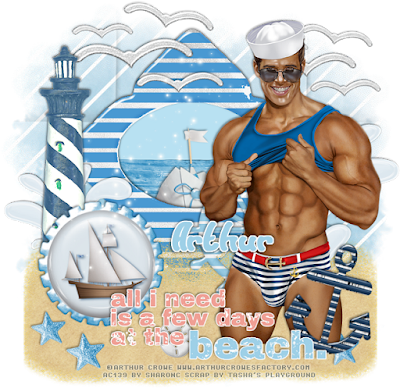
At The Beach


This tut was written for those with a basic knowledge of psp.
I am using the awesome artwork of  Arthur Crowe.
You need a license to use this art work. Please do not use without a license.
 
 You can find this art at his Store  HERE
Supplies Needed
I used PSPX...but any of them should work.
Just Beachy by Tasha's Playground  HERE
Check out the rest of her blog  HERE
RR Mask Set 2_1   HERE
 
Font of Choice, I used Sunset Beach

Drop Shadow usually V2 H2 50 black
 
Let's get started
*Remember to add your drop shadow as you go along*

Open a new image 800 x 800 or one you prefer

Resize paper 3 to 90%, paste and apply your mask, delete and merge group.

Paste frame 01 and move up some, click inside with your magic wand, expand by
5, add a new raster layer and fill with #b8e1f2, move below the frame,
then paste element 28, invert, delete, select none.

Resize element 18, paste below the frame layer in the center.

Paste element 10 on the left above the frame layer and move up some.
Resize the sand to 110%, paste and move toward the bottom of the frame.

Resize element 23 to 90%, place on the left above the sand layer and to
hide the bottom part of the lighthouse.

Resize element 20 to 75%, place on the right side more.

Resize your tube to 70%, place on the right side.
Resize element 9 to 90%, place behind your tube layer on the right,
duplicate, mirror, resize to 80%, move below the lighthouse.

Resize element 12 to 80%, place on the frame more to the left side,
duplicate, resize to 80% again and move to the right below the tube layer.

Resize the wordart element 25 to 85%, paste above your tube layer by the legs.

Resize element 1 to 55%, free rotate to the right at 15, place on the right below
the wordart.

Resize element 16 to 45% place on the left side of the sand, duplicate, resize to 90% and place by the first one. Duplicate as many times as you like and place in different areas.
Resize element 15 to 25% and place where you like on the sand.

Paste element 3 on the top layer.
 
Once happy with it all, close off any backgrounds, merge visible.
Resize first, then add your copyrights and name.
That's it
Hope you enjoyed doing my tut.

Friday, May 22, 2015

Summer Sunset

 
This tut was written for those with a basic knowledge of psp.
I am using the awesome artwork of Keith Garvey.
You need a license to use this art work. Please do not use without a license.
 
 You can find this art at his Store  HERE
 
Supplies Needed
I used PSPX...but any of them should work.
Scrap Summer Sunset by Gimptastic  HERE
RR Mask Set 2-1 HERE
Filters
Xero Filter-Mistifier
EyeCandy 4000-Gradient Glow
Font of Choice, I used Siti Maesaroh

Drop Shadow usually V2 H2 50 black
 
Let's get started
*Remember to add your drop shadow as you go along*

Open a new image 800 x 800 or one you prefer.
Paste paper 2, apply your mask, delete and merge group, then
paste paper 1, apply the mask again, delete and merge group.
Resize the bottom mask larger so it shows behind the other mask.

Paste frame 4, click inside with your magic wand, expand by 5, paste
paper 5, invert, delete, move below the frame layer, then
paste your close up tube, delete, select none.

Duplicate your close up, go to Adjust, Blur, Gaussian blur at 5,
change the blend mode to screen or one you prefer, merge down.
Apply the Xero filter-Mistifier
Haziness 145,  Strength 140,
all other numbers left at 255

Paste WA 1 at the top on the frame, apply a fat gradient glow, using
EyeCandy 4000 and the color #ebff64, width set at 3.

Paste the sand at the bottom, duplicate, mirror and adjust.

Paste the grass on one side, duplicate, mirror, duplicate again and move up
more to the wordart, duplicate, mirror.
Duplicate the grass again, resize to 50%, place in the center more,
duplicate and move over a bit.

Paste the vase on one side, resize to 80%, duplicate and mirror.

Paste the Sphinx on the right side, resize to 50%, then go to
Adjust, Hue and Saturation, colorize and place both numbers on 0.
Duplicate, change the blend mode to hard light and merge down.

Paste your tube on the left side.

Resize the coin to 50%, duplicate as many times as you like and place
where you like on the sand.

Paste the bronze below the paper layer of the frame on one side,
duplicate, mirror, adjust them to your liking.

Paste the bead below the coin layers, duplicate, resize to 50%, move above the coin layers, duplicate a couple more times and place how you like.

Paste the scatter on top of the mask layer, duplicate, mirror.

Resize the moon to 50%, paste below the wordart at the top in the center.

Crop your tag to be sure no stray shadows are on the edges of your tag.
Once happy with it all, close off any backgrounds, merge visible.
Resize first, then add your copyrights and name.
 
That's it
Hope you enjoyed doing my tut.